How to Track AI Traffic in GA4 and Find the Leads It Misses
Someone asks ChatGPT for a shortlist, sees your business, and three days later searches your name on Google and fills out your form. GA4 records that lead as Organic Search. The AI answer that started it never shows up.
You can track AI traffic in GA4, but only the visits that arrive with a referrer GA4 recognizes. A visitor might click directly from an AI tool, come back later through Google, type your URL, or pick up the phone. Each of those paths can credit the lead to Referral, Organic Search, Direct, or nothing useful.
That gap distorts how you judge your marketing. If AI is driving discovery and the credit lands elsewhere, you will underestimate it, misread changes in Direct or branded search, and leave more leads marked as unknown. This guide covers what GA4 can track, what Search Console and AI visibility tools add, where the gaps stay open, and how one question on your forms closes much of the rest.
In This Article
- Why AI Traffic Is Hard to Track in GA4
- How to Track AI Traffic and AI Visibility
- Why GA4’s AI Traffic Numbers Understate AI’s Influence
- Close the Gap With Self-Reported Attribution
- How to Add the Question Without Hurting Conversion Rates
- Build a Hybrid Attribution Model
- Frequently Asked Questions
Why AI Traffic Is Hard to Track in GA4
Digital attribution depends on a signal reaching your analytics: a click, a referrer, a UTM parameter, a cookie. AI discovery breaks that chain in several places.
A person may see your business in an AI answer and never click. They may click from an AI app or in-app browser that does not pass referral information. They may research on a phone and convert on a laptop. Or they may remember your name and come back through a branded search, a typed URL, or a phone call. AI shaped the decision in each case, and analytics recorded something else.
Two separate questions get confused here:
- Visibility: Is your brand or content appearing in AI-generated answers?
- Attribution: Did that visibility lead to a visit, lead, opportunity or sale?
Search Console, Semrush and Ahrefs help with the first question. GA4 identifies some AI referral sessions. None of them, alone, connects every AI interaction to a later lead or sale.
The common gaps:
- No-click discovery: The AI answer gives the user what they need and they never visit.
- Missing referrers: Some app and in-app browser visits arrive without source information GA4 can use.
- Later return visits: The user finds you through AI and returns through Direct, branded Organic Search or another channel.
- Cross-device journeys: Research happens on one device and the conversion on another.
- Privacy and consent restrictions: Declined cookies and browser privacy controls interrupt the attribution path.
- Offline conversions: The person calls or walks in after seeing you recommended.
None of this is unique to AI. Paid media, organic search, referrals and offline marketing lose attribution for the same reasons.
Where AI-Influenced Visits Show Up in GA4
The same AI-assisted visit can land in different GA4 channels depending on how the visitor reaches the site:
| What happened | GA4 may record it as | Why |
|---|---|---|
| Clicked a recognized AI link in a browser | AI Assistant | A recognized AI referrer reached GA4 |
| Clicked from an AI app or in-app browser with no usable referrer | Direct | GA4 received no source it could identify |
| Clicked from an AI source the native channel does not cover | Referral, or another matching channel | The source exists, but the native AI rule may not include it |
| Clicked a Google AI Overview or AI Mode link | Organic Search | Google reports these clicks within Search |
| Typed the website address later | Direct | The later visit has no referring source |
| Searched the brand later | Organic Search | GA4 sees the search visit, not the earlier AI discovery |
How to Track AI Traffic and AI Visibility
No single report answers every AI measurement question. These four sources each cover a different piece.
1. GA4’s AI Assistant Channel
Google added an AI Assistant channel to GA4’s default channel group in May 2026. It classifies visits from recognized AI assistant sources when the traffic arrives with source information GA4 can identify. Google’s current channel definition lists sources such as ChatGPT, Gemini, DeepSeek, Copilot and Grok.
Find it in Reports > Acquisition > Traffic acquisition using the session default channel group. When a referral matches Google’s rules, GA4 assigns the medium ai-assistant and groups the session under AI Assistant.
This is still referral-based measurement. If a visit arrives without usable source information, GA4 cannot put it in the AI Assistant channel just because an AI conversation happened earlier.
2. A Custom AI Channel Group in GA4
The native AI Assistant channel does not catch every identifiable AI referral source. A custom channel group pulls additional known AI sources into one category so you can analyze them together.
A custom channel group can reclassify source information GA4 already received. It cannot recreate a referrer that was never passed, or detect an AI interaction that left no measurable signal.
Part 1: Create the AI Channel Group
- Go to Admin > Data display > Channel groups.
- Create a new channel group and name it Channels with AI.
- Click Add new channel and name the channel AI Traffic.
- Under Channel conditions, set the rule to Source and matches regex.
- Add the AI domains you want included. A starting pattern:
(.*\.)?(chatgpt\.com|openai\.com|perplexity\.ai|claude\.ai|anthropic\.com|gemini\.google\.com|copilot\.microsoft\.com|deepseek\.com|grok\.com|x\.ai|poe\.com|meta\.ai|you\.com|mistral\.ai)- Click Or to add a second rule in the same group: Medium exactly matches
ai-assistant. This catches any AI source Google already recognizes, including ones your regex misses. - Click Reorder and move AI Traffic to the top of the list. It has to sit above Referral and Organic Search, because some AI tools pass organic as the medium, and above Google’s native AI Assistant channel so both sets of sources combine into one category.
- Save the channel group.
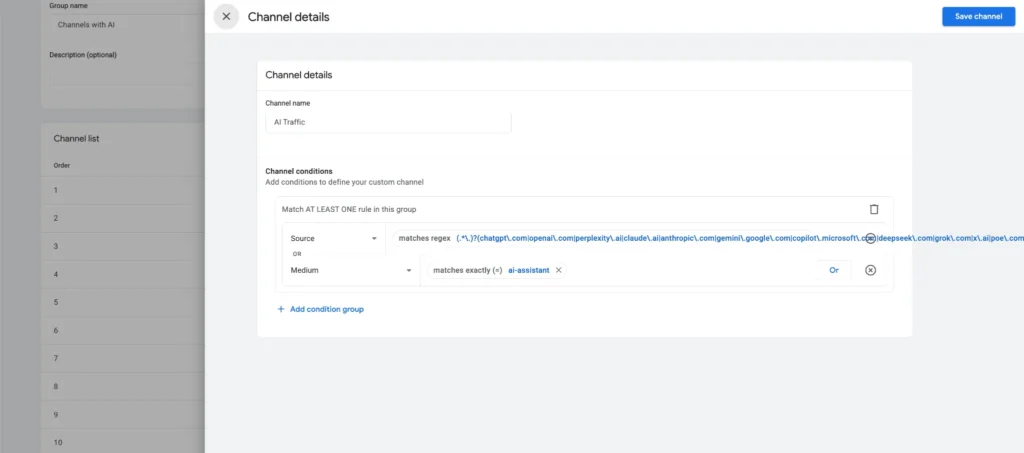
Review your Referral sources every so often and add or remove domains as AI platforms and their referral behaviour change.
Part 2: Add the New Group to Your Traffic Acquisition Report
- Refresh GA4 after creating the group so the new dimension is available.
- Go to Reports > Acquisition > Traffic acquisition.
- Click the Customize report pencil icon.
- Open Dimensions, choose Add dimension, and select Session Channels with AI.
- Apply the dimension.
- Save the changes to the report.
You can also make Channels with AI your property’s primary channel group. That change only applies from the day you switch. Historical data keeps the old classification.
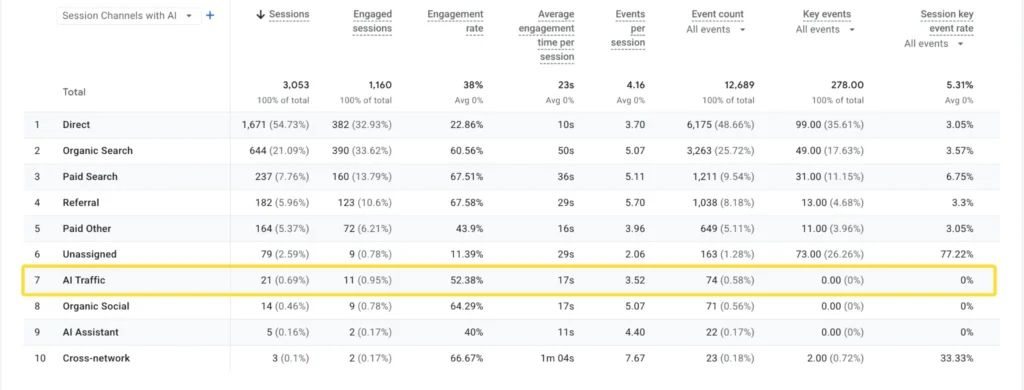
The custom channel now surfaces identifiable AI referral traffic that would otherwise be split across AI Assistant, Referral and other classifications. It still may not capture:
- AI app or in-app browser visits that arrive without usable source information
- AI answers that influence the user without a click
- Users who return later through Direct or branded search
- Cross-device journeys where the first discovery cannot be tied to the later session
The custom group classifies measurable AI traffic better. The wider attribution problem is still there.
3. Search Console for Google AI Visibility
Google Search Console’s Generative AI performance report measures something different. It reports organic impressions from Google AI Overviews and AI Mode and shows which pages appear, with dimensions such as country and device.
Use it to see which pages show up in Google’s generative search features and whether that visibility is rising or falling.
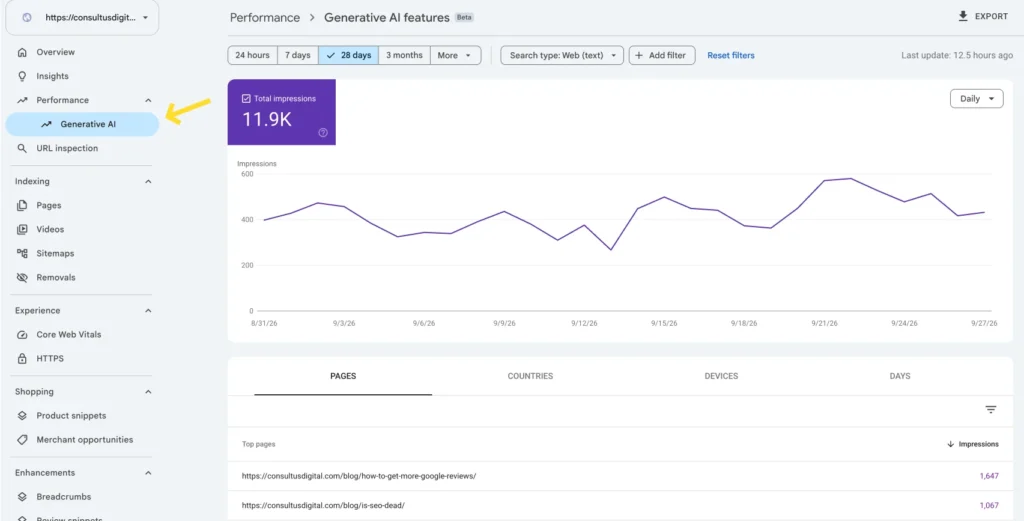
It is not an attribution report. The Generative AI report has no clicks, click-through rate, queries or average position, and it only covers Google’s own generative features. It does not connect impressions to a later lead or sale.
As of August 31, 2026, Google says the Generative AI insights have rolled out worldwide. A property may still not show the report if it has not received enough qualifying impressions. In the current interface it sits under Performance > Generative AI.
4. AI Visibility Tools for Mentions and Citations
Third-party AI visibility tools cover ground Google’s reports cannot. Semrush’s AI Visibility Toolkit and Ahrefs’ Free AI Visibility Checker test prompts across AI platforms to find brand mentions, cited pages and competitor visibility. They are useful for benchmarking, finding citation opportunities and tracking visibility over time.
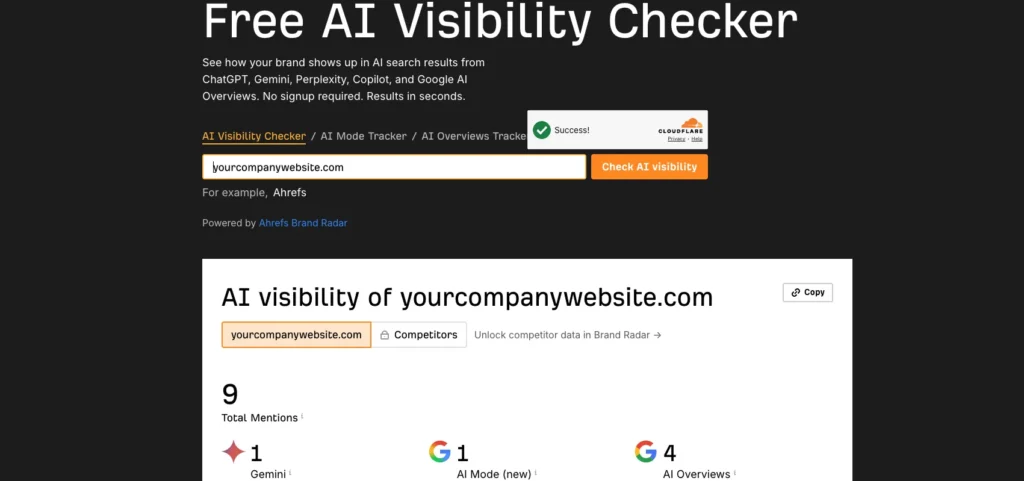
Do not treat their results as real user search or attribution data. These tools run tracked, sampled or simulated prompt sets, not the conversations your buyers are actually having, and AI answers can change between runs. Use them for questions about potential visibility and competitive presence, not to decide whether a specific AI interaction produced a lead.
Why GA4’s AI Traffic Numbers Understate AI’s Influence
Across 11 client websites we reviewed from June through August 2026, the native AI Assistant channel accounted for 0.29% of total sessions, with individual sites ranging from 0.11% to 1.49%. We also found at least 75 more identifiable AI sessions sitting in Referral instead of the native AI channel.
On those numbers alone, AI search looks close to irrelevant. But they only count the visits that carried enough source information for analytics to recognize.
Customer-reported attribution tells a different story in several published examples:
- Omniscient Digital reviewed 213 leads who answered a free-text attribution question. Of the 189 who named an AI tool, HubSpot’s first-touch source credited 28 to AI Referrals. Most of the rest were classified as Organic Search or Direct.
- Graphite reported that n8n’s GA4 last-touch attribution assigned about 0.9% of conversions to AI search, while a customer survey attributed about 9% to it.
- Finseo reported that AI search was the third most named discovery channel across 44,110 attribution survey responses collected from March 9 to August 31, 2026.
AI search is becoming a real research and discovery channel, and much of its influence happens before or outside the tracked website session. Checking the AI Assistant row in GA4 will not measure it. You have to ask.
Close the Gap With Self-Reported Attribution
Businesses have asked “How did you hear about us?” for decades, long before analytics could assign a source to a website visit. As UTMs, cookies, referrers and ad platforms got better, software attribution took over most of that work.
Software still cannot see the whole path. Someone may hear about a business from a friend, a social post or a podcast, then come back through Google and show up as Direct or Organic Search. Self-reported attribution (SRA) captures what the customer remembers, which can include influences tracking never saw.
Neither should replace the other. Software tells you what your tracking observed. SRA tells you what the customer says influenced them. A hybrid model keeps both.
How Self-Reported Attribution Recovered $120,000 in Unattributed Revenue
SRA is useful well beyond AI traffic. For one Ontario real estate services client, software attribution left gaps in channels we already knew were producing business. Their staff ask customers how they heard about the company during the sales process and record the answer.
When we compared those answers with the tracking data for July and August 2026, customer responses identified 34 more leads from Google or Facebook that the software had not attributed to either channel. That connected $120,000 in closed revenue to Google and Facebook that would otherwise have stayed unattributed in channel reporting.
The breaks that hide AI’s influence hit every channel: declined cookies, in-app browsers, device switches, a phone call instead of a tracked form. SRA gives you a second signal when that happens.
How to Add the Question Without Hurting Conversion Rates
Keep the question simple, put it where it interrupts the least, and watch whether it changes form performance.
Use one open-text question
Use the same wording everywhere: “How did you hear about us?”
Open text usually beats a dropdown because it does not limit people to the sources you expected. It can surface answers like “ChatGPT recommended you,” “my neighbour used you” or “I saw your truck on my street.” It also avoids the option-order bias a dropdown introduces.
Put it at the end of the form
Place it after the fields you need to process the enquiry, right above the submit button. By then the visitor has finished the essentials, so the extra question is less likely to stop them.
Test required versus optional
A required field gets a response on every completed form, though not every answer will be usable. An optional field adds less friction and leaves more gaps.
For forms with enough volume, run a 60-day test. Record the baseline conversion rate before adding the field, monitor it after launch, and track the share of usable answers. If conversions drop meaningfully, test making the field optional.
Ask the same question on phone leads
If a meaningful share of leads come by phone, make the question part of the call script. Log the answer in the same CRM field so form and phone leads can be analyzed together.
Build a Hybrid Attribution Model
SRA is most useful when it sits next to the software attribution you already collect, not in a separate report. Keep both versions of the path: what your tracking observed, and what the customer says brought them in. Then you can compare them, investigate gaps, and apply consistent rules when they disagree.
A practical lead record includes:
- Software source: original source, medium, landing page and any UTM information
- SRA answer: the customer’s response exactly as entered or recorded
- SRA category: the channel assigned to that response, such as AI search, referral, paid search, social or offline
Do not overwrite the software source when the customer gives a different answer. Keep both.
Classify the answers before reporting
Open-text answers need to be grouped into reporting categories. Start with simple rules for common responses, then review the leftovers by hand.
- AI search: ChatGPT, OpenAI, Gemini, Claude, Perplexity, Copilot or a clear reference to an AI assistant
- Search: Google, Bing or another search engine, when the answer does not say whether it was paid or organic
- Referral: friend, neighbour, family member, colleague or customer recommendation
- Social: Facebook, Instagram, YouTube, LinkedIn or another social platform
- Offline: vehicle signage, event, billboard, print or another offline source
Keep anything unclear as Unknown instead of forcing it into a channel. When the same new answer keeps appearing, add it to the rules.
What to do when software and customer answers disagree
Disagreement does not mean one of them is wrong. They often describe different stages of the same path. Analytics records the session that brought someone back; the customer reports what first introduced them.
Someone finds a company through ChatGPT and returns through a branded Google search. GA4 records Organic Search. The customer says ChatGPT. Both are useful.
Decide how you will handle these differences before the data reaches a report. Keep the software source, the raw customer response and the final reporting category as separate fields. That gives you an audit trail, stops useful data from being overwritten, and lets you refine the rules as evidence builds.
Get Help Tracking AI Traffic
Consultus Digital is an SEO and AI search agency in Toronto. We set up AI traffic tracking and attribution in GA4 and add self-reported attribution to lead forms, so you can see what AI search is contributing. Contact us to talk about your setup.
Frequently Asked Questions
Does GA4 track AI traffic automatically?
Partly. GA4’s AI Assistant channel classifies traffic from recognized AI assistant sources when identifiable referral information reaches the site. It misses AI-influenced visits with no tracked click or usable referrer.
Why does AI traffic show up as Direct in GA4?
A visit appears as Direct when GA4 receives no source information it can use. That happens with some app-based or privacy-restricted visits, and when a person finds a business through AI and later types the URL.
Can a custom GA4 channel group recover all AI traffic?
No. It can reclassify source data GA4 already has, including known AI sources that would otherwise sit in Referral. It cannot reconstruct an AI interaction when no identifiable source reached the site.
What does Search Console show for AI search?
The Generative AI performance report shows impressions from Google’s generative search features, such as AI Overviews and AI Mode, by page, country and device. It is a visibility report, not a lead-attribution report.
Are AI visibility tools the same as traffic tracking?
No. They monitor mentions, citations and tracked prompts across AI platforms. They measure exposure and competitive visibility, but they do not show the path from a real buyer’s AI conversation to a lead.
Should “How did you hear about us?” be a dropdown?
Open text is usually more useful. It captures sources you did not think to list and lets customers describe them in their own words. You classify the answers into reporting categories afterward.
Is self-reported attribution accurate?
It has limits. Customers forget, simplify, or name the most memorable touchpoint. That is why it works best alongside software attribution, not as a replacement.